JSP JavaMail 发送邮件
JSP 使用 JavaMail API 可以发送电子邮件
环境配置
JSP 发送电子邮件需要在计算机上安装 Sun Java Mail 、JavaMail API 和 Java Activation Framework)JAF)
-
可以从 Github 载最新版本的 JavaMail
-
可以从 Java 网站下载最新版本的 JAF(版本 1.1.1)
-
可以从 下载最新版的 SUN JAVA MAIL 1.6.0
下载并解压缩这些文件,找到 mail.jar 和 activation.jar 文件,然后添加到 CLASSPATH 中
你也可以点击以下链接直接下载
下载完成后直接把它们添加到 CLASSPATH
范例 : 发送一封简单的邮件
下面的范例将从我们的计算机上发送一封简单的电子邮件
我们假设你的 本地主机 已连接到互联网,并支持发送电子邮件
同时确保 Java Email API 包和 JAF 包的所有的 jar 文件在 CLASSPATH 中都是可用的
webapp/send_main.jsp
<%@ page language="java" contentType="text/html; charset=UTF-8" pageEncoding="UTF-8"%>
<%@ page import="java.io.*,java.util.*,javax.mail.*"%>
<%@ page import="javax.mail.internet.*,javax.activation.*" %>
<%@ page import="javax.servlet.http.*,javax.servlet.*" %>
<%@ page import="java.security.GeneralSecurityException"%>
<%@ page import="com.sun.mail.util.MailSSLSocketFactory"%>
<%!
/**
* 验证账号密码
* 发送邮件必须的步骤
* @author Administrator
*
*/
public class EmailAutherticator extends Authenticator
{
    String username = "";
    String password = "";

    public EmailAutherticator(String username,String password)
    {
        this.username = username;
        this.password = password;
    }

    public PasswordAuthentication getPasswordAuthentication()
    {
        return new PasswordAuthentication(username, password);
    }
}
%>
<%

String result = "";
String username = "example@example.com";
String password = "";

// 收件人的电子邮件 ID
String to = "example@example.com";

// 发件人的电子邮件 ID
String from = username;

// 假设您是从本地主机发送电子邮件
String host = "smtp.qq.com";

// 获取系统的属性
Properties props = System.getProperties();

// 开启debug调试
props.setProperty("mail.debug", "true");
// 发送服务器需要身份验证
props.setProperty("mail.smtp.auth", "true");
// 设置邮件服务器主机名
props.setProperty("mail.host", "smtp.qq.com");
// 发送邮件协议名称
props.setProperty("mail.transport.protocol", "smtp");
props.setProperty("mail.smtp.port", "465");
props.setProperty("mail.smtp.socketFactory.port", "465");


//使用SSL,企业邮箱必需!
//开启安全协议
MailSSLSocketFactory sf = null;
try {
  sf = new MailSSLSocketFactory();
  sf.setTrustAllHosts(true);
} catch (GeneralSecurityException e1) {
  e1.printStackTrace();
}

props.put("mail.smtp.ssl.enable", "true");
props.put("mail.smtp.ssl.socketFactory", sf);


EmailAutherticator auth = new EmailAutherticator(username,password);

// 获取默认的 Session 对象
Session sendmail_session = Session.getDefaultInstance(props,auth);


try{
  // 创建一个默认的 MimeMessage 对象
  MimeMessage message = new MimeMessage(sendmail_session);

  // 设置 From: header field of the header.
  message.setFrom(new InternetAddress(from));

  // 设置 To: header field of the header.
  message.addRecipient(Message.RecipientType.TO,
                           new InternetAddress(to));

  // 设置 Subject: header field
  message.setSubject("你好,这是一份简单的电子邮件!,来自简单教程(www.twle.cn)");

  // 设置实际的邮件正文消息,内容大小不限
  message.setText("简单教程(twle.cn),简单编程\n\nJSP JavaMail 发送邮件 - JSP 基础教程 | 简单教程(www.twle.cn)");
  // 发送消息
  Transport.send(message);

  result = "成功发送电子邮件...";
}catch (MessagingException mex) {
  mex.printStackTrace();
}


%>
<!DOCTYPE html>
<meta charset="utf-8">
<title>JSP JavaMail 发送邮件 - JSP 基础教程 | 简单教程(www.twle.cn)</title>
<p><% out.println("Result: " + result + "\n");%>
</p>
<p>JSP JavaMail 发送邮件 - JSP 基础教程 | 简单教程(www.twle.cn)</p>
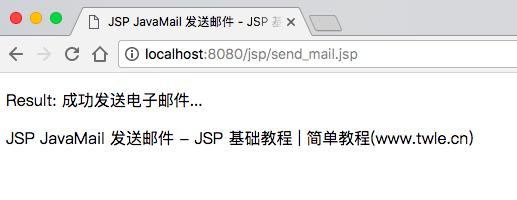
在浏览器上输入 http://localhost:8080/jsp/send_mail.jsp 显示结果如下
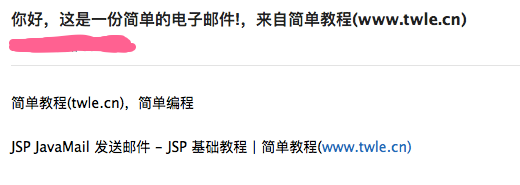
然后就可以在邮件箱就能看到我们刚刚发送的邮件
多个收件人
如果想要把邮件发送给多人,下面列出的方法可以用来指明多个邮箱地址:
void addRecipients(Message.RecipientType type,
                   Address[] addresses)
throws MessagingException
参数的描述如下:
-
type:这个值将会被设置成 TO,CC,或BCC。CC代表副本,BCC代表黑色副本,例子程序中使用的是TO
-
addresses:这是一个邮箱地址的数组,当指定邮箱地址时需要使用InternetAddress()方法。
用户认证部分
如果邮件服务器需要用户名和密码来进行用户认证的话,可以做如下设置
props.setProperty("mail.user", "myuser");
props.setProperty("mail.password", "mypwd");